Scalable E-Commerce
Architecture (Monolithic to Microservices)
Building Blocks for E-Commerce: -
The ecommerce is made up of various services such as Product
Information System, Order Management System, Price Management System, Inventory
Management System and others. The platform is monolithic if all service is tightly
coupled and available on single platform only.
Traditional vs modern e-commerce architecture
With traditional, monolithic
e-commerce architectures, it’s impossible to modify individual
e-commerce functions without compromising the entire system. Something as
simple as upscaling infrastructure for a product launch or holiday weekend can
require months of preparation.
With modern, service-oriented e-commerce
architectures, brands don’t need months to prepare for an event that only lasts
a few days. They can also update, upscale, or enhance individual services
within their tech stack without jeopardizing the entire system.
Traditional: In a traditional e-commerce architecture, a
monolithic platform is used to power one sales channel or head. Introducing
another channel often means using another platform, leading to disconnected
data, technical debt, and higher
e-commerce software costs.
Modern: In
a modern e-commerce architecture, a “headless” commerce API is used as a data
communication layer to power multiple sales channels or heads. Services like
the product
information manager (PIM) and order
management system (OMS) are separate, scalable services and
connected through APIs. The headless CMS functions as another scalable service
that provides the content to infinite channels.
While some monolithic commerce platforms offer
the ability to decouple the
frontend from the backend and make the system headless, the
backend remains unscalable. In the rest of this article, I’ll walk you through
the high-level steps needed to create a scalable e-commerce website
architecture using microservices rather than a traditional monolith.
Step 1: Review Your
Current E-Commerce Architecture
Before designing a microservices e-commerce
architecture, it’s essential to review existing architecture to identify
existing software and challenges. This will help you map priorities, determine
technical capabilities, and effectively plan for the new architecture.
Let’s take a look at an
unscalable, traditional architecture that many
high-growth brands use in niche verticals. First, we’ll review
the software, then we’ll highlight some challenges with the software and the
e-commerce architecture. Use the same approach during your review, complete
with a high-level diagram like the one below.
The software this brand uses includes:
·
Magento website: The brand uses this platform to
power its main e-commerce site. It chose Magento because
it’s free and relatively easy to use. However, more and more Magento extensions
are used over time.
·
Shopify side site: The brand launched a daily
deals site on Shopify since connecting another sales channel to Magento was not
intuitive. However, this led to inventory and
fulfillment issues.
·
Square in-store POS: This is the first
technology the brand purchased when it launched its in-store business. Magento
and Shopify were added later on.
The biggest software-related challenges this
brand faces include:
·
Overselling occurs because Shopify, Magento, and
the POS do not communicate with one order management system (OMS).
·
Productivity declines because offline
conversations, paperwork, and patchy Magento extensions are required to make
the system work.
·
The brand needs additional resources for data
entry since connecting channels require manual data entry in spreadsheets or Quickbooks.
·
Magento extensions and Shopify apps cause single
points of failure; installing, uninstalling, or updating them can bring down
the entire system.
Clearly defining your existing architecture,
software, and challenges like this is imperative for setting up a new approach
to a service-oriented e-commerce architecture that’s more scalable.
Step 2: Build or Buy E-Commerce Microservices
Once you understand your existing architecture
and business needs, it’s time to choose an approach to replace it that does not
require an expensive and risky replatforming
project. The primary choice at this stage is between building or
buying commerce microservices, applications, and APIs.
An example of a
differentiating feature is a room builder for a home decor e-commerce company.
Examples of necessary features include catalog management, cart, pricing, and
checkout.
Building e-commerce
microservices
Building a complete microservices architecture for e-commerce in-house is only viable for an enterprise with complex needs. A custom solution can be more expensive to build and maintain. So, unless you’re a billion-dollar enterprise like Amazon, it’ll probably end up being more trouble than it’s worth.
However, there are some microservices you will want to build in-house. One popular way for building custom e-commerce applications is with Amazon elastic container services (ECS). This is a service that lets you quickly launch, exit, or manage docker containers on a cluster. Amazon ECS maintains the application's availability, allowing users to scale containers when necessary.
Developers at e-commerce brands can also build their own system using Docker. Docker packages individual applications into Docker containers and uses tools such as Kubernetes and Portainer to manage and scale containerized applications (i.e. microservices). Further, you can use tools such as Kong or Ocelot to act as API gateway and help backend microservices communicate with frontend client devices.
As you can see, there are many tools required to build e-commerce microservices in-house. Besides creating and managing service containers, developers and operation teams need to configure applications to handle load balancing, service discovery, logging, monitoring, and tracing. That’s a lot of overhead. If the company isn’t careful, it can have many distributed monoliths in its e-commerce architecture.
Buying e-commerce
microservices
Another way to build a scalable e-commerce architecture is by using commerce services and APIs from third-party providers. This approach can help brands architect a microservices-based infrastructure while simplifying service management. Below is a simple e-commerce infrastructure diagram that demonstrates a microservices-based architecture.
Backend: There are a robust set of apps that includes a PIM, OMS, and pricing engine that come with a user interface for business users. These modular, independent applications are equipped with APIs to provide as much flexibility as custom applications.
API: To orchestrate data and events between the frontend and backend, brands must have an API middle layer. This layer allows them to move away from monolithic architectures by “microservicing” elements of their tech stack one at a time instead of all together.
Frontend: The
frontend is managed by a headless CMS that supports multiple frameworks like
Angular, React, and Vue to build reusable components. It lets you control the
entire frontend shopping experience by integrating commerce services via APIs.
Third-party providers give the flexibility
needed to design a future-proof e-commerce architecture. It lets retailers add,
remove, and modify individual microservices within their architecture without
risking the entire system and building the microservices themselves.
Step 3: Break Down Your Monolithic Architecture
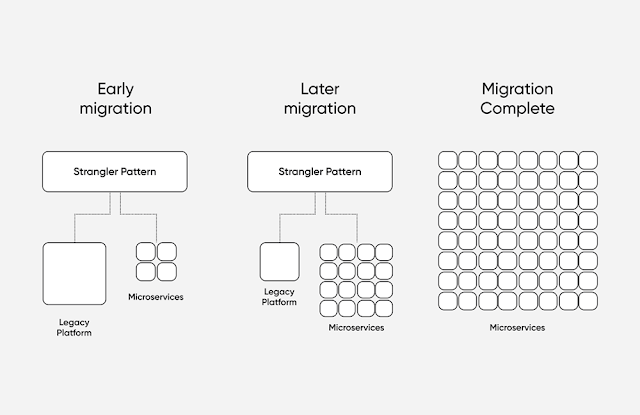
After finalizing the new architecture, it’s time to move away from the old, legacy commerce platform. While there are many modern-day design patterns, it’s best to use the strangler pattern to migrate to a modern, service-oriented platform. This approach helps you move away from a monolith by replacing one component at a time. It minimizes the risk of project failure during migration and distributes the development effort needed.
Legacy platforms such as Magento, Shopify, and Oracle ATG let you separate the frontend and e-commerce backend with APIs. E-commerce businesses can leverage this and use API calls to pull data onto a modern frontend like backend commerce components with microservices such as Stripe for payments, Algolia for search.
Let’s assume a brand wants to start with migrating the catalog in its monolithic e-commerce platform to a modular, service-oriented PIM. The first step is to export all product data in a format that’s compatible with the new microservices-based system. Then you need to parse and import it into the new database. The actual process will vary based on the choice of service and database. However, here’s a sample Node script that uses the XmlStream library:
const fs = require('fs')const XmlStream = require('xml-stream') ;const stream=fs.createReadStream(catalog.xml');
const xml = new XmlStream(stream);
xml.preserve('product-id', true);xml.collect('product');xml.on('endElement: product-id', function(item) {saveToDatabase(item);
});
Legacy platforms such as Magento, Shopify, and Oracle ATG let you separate the frontend and e-commerce backend with APIs. E-commerce businesses can leverage this and use API calls to pull data onto a modern frontend like backend commerce components with microservices such as Stripe for payments, Algolia for search.
Let’s assume a brand wants to start with migrating the catalog in its monolithic e-commerce platform to a modular, service-oriented PIM. The first step is to export all product data in a format that’s compatible with the new microservices-based system. Then you need to parse and import it into the new database. The actual process will vary based on the choice of service and database. However, here’s a sample Node script that uses the XmlStream library:
Step 4: Rally
Support Around the New Architecture
Engineers and developers can craft solid implementation ideas and migration strategies to deploy a microservice architecture. However, they’ll likely need the entire organization's support, including C-level executives and board of directors at some level during the project.
A recent MIT Sloan Management report reveals that every successful digital transformation demands that leaders transform themselves digitally first. Adopting a new e-commerce architecture is unlikely to be effective without leadership embracing and championing the modern, scalable e-commerce approach. Key stakeholders and business executives must be ready for the changes and long-term commitment of this new, modern architecture.
Also, the development team must believe enough in the idea to “light up” the rest of the organization. Because adopting a microservice architecture requires more deployable units, it takes more effort to implement. So it's much harder to scale without the whole team on board. The engineering team should show key departments why a microservices system is far more scalable and easier to customize, as well as the preparations and the commitment needed to implement it effectively.
Following this step and other steps outlined above will position your company for long-term success without bringing ongoing activities across merchandising, marketing, and development to a standstill.
As business grows the demands for scalability and flexibility increases to meet the needs.
Benefits of Monolithic Architecture: -
- - Simple to develop
- - Simple to Test (Functional Test using Selenium)
- - Simple Deployment
- - Simple Scale Horizontally. Multiple Copies behind load balancer
Drawbacks of Monolithic Architecture: -
- - Limitation in size and complexity
- - Larger the Application, more the complexity
- - Performance effected as consumption of application grows
- - Deploy whole application every time
- - Extensive Manual Testing
- - Any bug can bring down whole application
- - Hard to accept new technologies
-
Instead of using monolithic approach, the application can be distributed in various microservices which run independently. The microservices could be exposed using various API like REST or RPC. The micro service itself is independent application which have it own way to save or expose data. Also, the application can have their own database (RDBMS or NoSQL).
Basic Architecture for micro service: -
Microservice Base eCommerce
Application: -
Useful Integration
Tools for Ecommerce: -
·
ERP (Enterprise Resource Planning system)
to streamline the exchange of information between a company’s different units
(e.g., finance department, warehouses). Example SAP
·
PIM (Product Information Management system)
to collect holistic information about products and push it online. Example: CDS
(Content Delivery Drupal)
·
Personalization tool to increase the return
from marketing initiatives, to position the brand as caring about customers’
time and knowing their habits. (Frontend UI : System Builder)
How
to Migrate from Monolithic to Modular Architecture
Tools :-